Breathing New Life into a Classic: The Ultimate Guide to BlackBerry Passport and LineageOS
The BlackBerry Passport remains one of the most unique smartphones ever created. Released in 2014, its physical three-row keyboard, capacitive touch scrolling, and perfectly square 4.5-inch screen challenged conventional smartphone design. However, when BlackBerry officially shut down its infrastructure and legacy services, this hardware masterpiece was left stranded on the outdated BlackBerry 10 (BB10) operating system.
For tech enthusiasts and nostalgists, letting such iconic hardware gather dust is not an option. This has led many to wonder: Can you run LineageOS, the gold standard of custom Android ROMs, on a BlackBerry Passport?
Here is a deep dive into the technical realities, the history of porting Android to the Passport, and how you can maximize the utility of this classic device today. The Core Technical Reality: Can the Passport Run LineageOS?
To put it directly: There is no stable, official, or fully functional version of LineageOS for the BlackBerry Passport.
While developers have successfully ported LineageOS and older CyanogenMod builds to Android-native BlackBerry devices like the BlackBerry Priv, KEYone, and KEY2, the Passport presents a fundamentally different architecture challenge. Why Custom ROMs are Difficult on the Passport
Locked Bootloader: BlackBerry built its reputation on enterprise-grade security. The Passport features a deeply locked bootloader with hardware-verified secure boot. Without an unlocked bootloader, loading a custom kernel (which LineageOS requires) is virtually impossible.
Proprietary Hardware Drivers: The Passport’s unique hardware—specifically its 1:1 square display aspect ratio (1430 x 1430) and its capacitive touch-sensitive physical keyboard—relies on proprietary drivers. Even if the bootloader were bypassed, writing open-source drivers for these components to communicate with Android is a monumental task.
The Processor Architecture: The Snapdragon 801 processor inside the Passport is 32-bit. Modern LineageOS builds (LineageOS 17.1 through 21) are strictly 64-bit, meaning developers would have to backport code to an ancient, unsupported Android base (like Android 4.4 or 6.0) to even attempt compatibility. The Closest Alternatives: Running Android Apps on BB10
While you cannot completely wipe BB10 to install LineageOS, you can experience a hybrid Android environment. BlackBerry 10 includes a built-in Android Runtime (an emulation layer).
By utilizing this runtime, you can run thousands of Android applications, effectively giving you the app utility of an older Android device without changing the operating system. Maximizing the Built-in Android Runtime
Out of the box, the BlackBerry Passport runs an Android 4.3 Jelly Bean runtime environment. Here is how enthusiasts bridge the gap today:
Sideloading APKs: You can download .apk files directly through the native BlackBerry browser via trusted repositories like APKMirror and install them.
Alternative App Stores: Since the BlackBerry World store is defunct, users install lightweight, third-party marketplaces like Flement, Aurora Store, or the Amazon Appstore to download compatible legacy apps.
Cobalt's Official Google Play Services Kitchen: A legendary developer named Cobalt232 created a method to patch Google Play Services directly onto BB10. This allows Passport users to log into their Google accounts, synchronize contacts, and use the official Google Play Store, though its stability has declined as Google deprecates older Android versions. Why a Passport Running LineageOS Remains a Dream
If the developer community ever fully cracked the Passport's bootloader, a dedicated LineageOS ROM would transform the device. LineageOS is famous for its lightweight footprint, privacy-focused features, and lack of bloatware.
On a Passport, LineageOS would offer several massive upgrades:
Modern App Compatibility: Even an older build like LineageOS 14.1 (Android 7.1 Nougat) would open the door to modern banking apps, secure messengers (like Signal and WhatsApp), and lightweight browsers.
System-Wide Dark Mode: A staple of LineageOS that would look stunning on the Passport's high-density IPS display.
Enhanced Privacy Controls: LineageOS’s Trust interface would allow users to manage app permissions granularly, reviving BlackBerry's original ethos of ultimate data security. What Can You Do With a BlackBerry Passport Today?
If you own a BlackBerry Passport and want to put it to use, you must adjust your expectations. Because the underlying Android runtime is stuck on version 4.3, mainstream apps like modern WhatsApp, YouTube, and Spotify will no longer function natively.
However, the Passport excels as a secondary, distraction-free device or a dedicated productivity tool: 1. The Ultimate Distraction-Free Writing Device
The Passport's keyboard is widely considered one of the best ever made. By using native BB10 text editors or sideloading an older, compatible version of an app like iA Writer, the Passport becomes an incredible pocket-sized typewriter for journalists, novelists, and note-takers. 2. A Dedicated E-Reader
The square, wide screen is uniquely suited for reading text. Sideloading older versions of the Amazon Kindle app or KOReader transforms the Passport into an ergonomic e-reader that fits perfectly in one hand. 3. Retro Gaming Emulator
The Snapdragon 801 processor and 3GB of RAM are more than capable of handling retro emulation. Via native BB10 emulators or sideloaded Android ones, the square screen is highly compatible with older 4:3 aspect ratio games from the Game Boy, NES, and Sega Genesis eras. 4. Local Music and Podcast Hub
The Passport features excellent internal audio DACs and robust stereo speakers. Combined with an expandable microSD card slot, it makes for a fantastic offline media player. Final Thoughts: Appreciating the Hardware As-Is
The intersection of the BlackBerry Passport and LineageOS represents a beautiful "what-if" in mobile technology. While the dream of a fully open-source, Android-powered Passport remains blocked by locked bootloaders and missing drivers, the device still commands respect.
If you are looking for a true hardware keyboard experience powered by LineageOS, your best bet is to look toward devices with unlockable bootloaders, such as the BlackBerry Priv , or modern alternatives like the Unihertz Titan series , which openly embrace the Android ecosystem. For the Passport, it remains a monument to industrial design—best enjoyed as a vintage piece of productivity art.
If you are trying to configure your device, let me know what specific apps you want to run or which OS version your Passport is currently on . I can provide the exact steps or legacy download links to help you get the most out of your hardware. Share public link
This public link is valid for 7 days and shares a thread, including any personal information you added. This link or copies made by others cannot be deleted. If you share with third parties, their policies apply. Can’t copy the link right now. Try again later.
Installing Lineage OS on BlackBerry Passport: A Step-by-Step Guide
The BlackBerry Passport, a iconic smartphone from 2014, can still be revived with a custom ROM like Lineage OS. In this article, we'll guide you through the process of installing Lineage OS on your BlackBerry Passport.
What is Lineage OS?
Lineage OS is a free, open-source operating system based on Android. It's a popular custom ROM that offers a clean, bloat-free experience, with regular security updates and feature enhancements. Lineage OS is the spiritual successor to CyanogenMod, another well-known custom ROM.
Why Install Lineage OS on BlackBerry Passport?
The BlackBerry Passport, while a great device in its time, no longer receives official updates from BlackBerry. By installing Lineage OS, you can:
Get the latest Android version : Lineage OS offers Android 10 and 11 support, which means you can enjoy the latest features, security patches, and performance enhancements.
Remove bloatware : Lineage OS provides a clean, stock Android experience, free from unnecessary pre-installed apps.
Improve performance : Lineage OS is optimized for performance, which can breathe new life into your aging BlackBerry Passport.
Backup your data : Create a full backup of your device, including your contacts, photos, and any important files.
Charge your device : Ensure your BlackBerry Passport is fully charged or at least 50% charged.
Unlock your bootloader : You'll need to unlock your bootloader to install a custom ROM. This process will erase all data on your device.
Install necessary drivers : Download and install the BlackBerry USB driver on your computer.
Step-by-Step Installation Guide
Here's a step-by-step guide to installing Lineage OS on your BlackBerry Passport:
Step 1: Unlock Bootloader
Download the TWRP recovery image for BlackBerry Passport.
Connect your device to your computer via USB.
Open a command prompt or terminal on your computer and navigate to the TWRP image location.
Type adb reboot bootloader to reboot your device into bootloader mode.
Type fastboot flash recovery twrp.img to flash TWRP recovery.
Step 3: Install Lineage OS
Download the Lineage OS zip file for BlackBerry Passport.
Copy the zip file to your device's internal storage.
Reboot your device into TWRP recovery mode.
In TWRP, select Install and choose the Lineage OS zip file.
Swipe to confirm the installation.
Step 4: Install Google Services (Optional)
If you want to use Google services like Google Play Store, Google Maps, and Google Assistant:
Vehicles
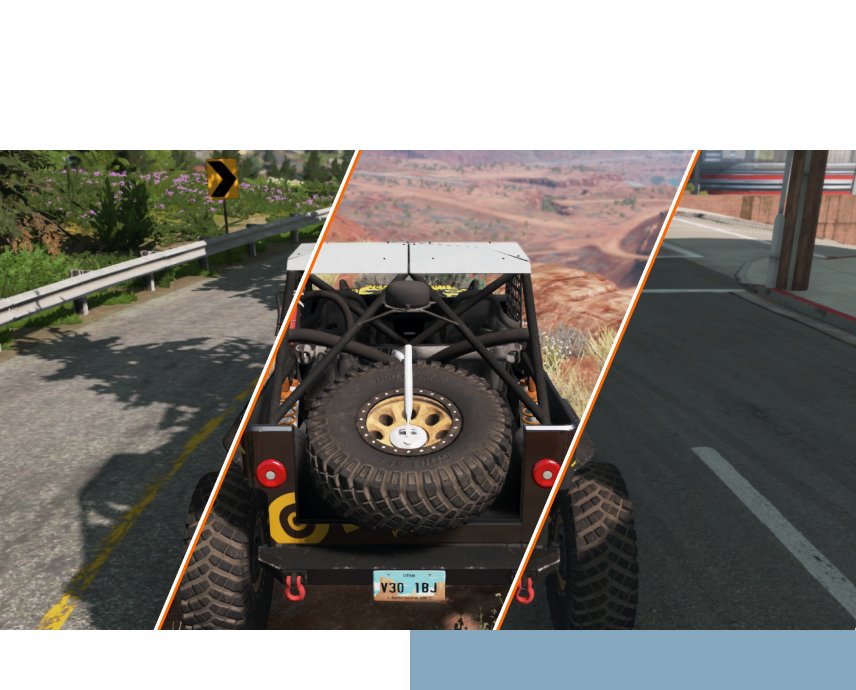
BeamNG.drive offers dozens of refined, completely customizable vehicles to experiment with. Whether it’s a compact car or massive truck, players can tweak away at all the moving parts to create just about any driving experience desirable. Wheels, suspension, engines, and more; everything is under your control.
There’s plenty to discover while driving. Featuring 12 sprawling, beautiful open-world environments, the terrain feels as vast and diverse as the gameplay options. Test out a new setup through tropical jungle passages, barren deserts, urban boulevards, packed highways, and much more.
The entire gameplay experience can be tailored to the player's specifications. Everything from vehicles to the very physical properties that affect the in-game environments. With our out-of-the-box World Editor, everyone can put a twist on their in-game experience.
Modding and Community
Our vibrant community of enthusiasts regularly shares interesting vehicle builds, terrains, and scenarios for others to enjoy. The modding capabilities in BeamNG.drive are vast, allowing players to customize and fine-tune just about anything.
Automation
Through our partnership with Automation - the car company tycoon game - players can export their creations into BeamNG.drive. Design your custom car and engine, tailor everything to your specifications, choose the "export" option, start up BeamNG.drive, and hop in for a test ride.
Breathing New Life into a Classic: The Ultimate Guide to BlackBerry Passport and LineageOS
The BlackBerry Passport remains one of the most unique smartphones ever created. Released in 2014, its physical three-row keyboard, capacitive touch scrolling, and perfectly square 4.5-inch screen challenged conventional smartphone design. However, when BlackBerry officially shut down its infrastructure and legacy services, this hardware masterpiece was left stranded on the outdated BlackBerry 10 (BB10) operating system.
For tech enthusiasts and nostalgists, letting such iconic hardware gather dust is not an option. This has led many to wonder: Can you run LineageOS, the gold standard of custom Android ROMs, on a BlackBerry Passport?
Here is a deep dive into the technical realities, the history of porting Android to the Passport, and how you can maximize the utility of this classic device today. The Core Technical Reality: Can the Passport Run LineageOS?
To put it directly: There is no stable, official, or fully functional version of LineageOS for the BlackBerry Passport.
While developers have successfully ported LineageOS and older CyanogenMod builds to Android-native BlackBerry devices like the BlackBerry Priv, KEYone, and KEY2, the Passport presents a fundamentally different architecture challenge. Why Custom ROMs are Difficult on the Passport
Locked Bootloader: BlackBerry built its reputation on enterprise-grade security. The Passport features a deeply locked bootloader with hardware-verified secure boot. Without an unlocked bootloader, loading a custom kernel (which LineageOS requires) is virtually impossible.
Proprietary Hardware Drivers: The Passport’s unique hardware—specifically its 1:1 square display aspect ratio (1430 x 1430) and its capacitive touch-sensitive physical keyboard—relies on proprietary drivers. Even if the bootloader were bypassed, writing open-source drivers for these components to communicate with Android is a monumental task.
The Processor Architecture: The Snapdragon 801 processor inside the Passport is 32-bit. Modern LineageOS builds (LineageOS 17.1 through 21) are strictly 64-bit, meaning developers would have to backport code to an ancient, unsupported Android base (like Android 4.4 or 6.0) to even attempt compatibility. The Closest Alternatives: Running Android Apps on BB10
While you cannot completely wipe BB10 to install LineageOS, you can experience a hybrid Android environment. BlackBerry 10 includes a built-in Android Runtime (an emulation layer).
By utilizing this runtime, you can run thousands of Android applications, effectively giving you the app utility of an older Android device without changing the operating system. Maximizing the Built-in Android Runtime
Out of the box, the BlackBerry Passport runs an Android 4.3 Jelly Bean runtime environment. Here is how enthusiasts bridge the gap today:
Sideloading APKs: You can download .apk files directly through the native BlackBerry browser via trusted repositories like APKMirror and install them.
Alternative App Stores: Since the BlackBerry World store is defunct, users install lightweight, third-party marketplaces like Flement, Aurora Store, or the Amazon Appstore to download compatible legacy apps.
Cobalt's Official Google Play Services Kitchen: A legendary developer named Cobalt232 created a method to patch Google Play Services directly onto BB10. This allows Passport users to log into their Google accounts, synchronize contacts, and use the official Google Play Store, though its stability has declined as Google deprecates older Android versions. Why a Passport Running LineageOS Remains a Dream
If the developer community ever fully cracked the Passport's bootloader, a dedicated LineageOS ROM would transform the device. LineageOS is famous for its lightweight footprint, privacy-focused features, and lack of bloatware.
On a Passport, LineageOS would offer several massive upgrades:
Modern App Compatibility: Even an older build like LineageOS 14.1 (Android 7.1 Nougat) would open the door to modern banking apps, secure messengers (like Signal and WhatsApp), and lightweight browsers.
System-Wide Dark Mode: A staple of LineageOS that would look stunning on the Passport's high-density IPS display.
Enhanced Privacy Controls: LineageOS’s Trust interface would allow users to manage app permissions granularly, reviving BlackBerry's original ethos of ultimate data security. What Can You Do With a BlackBerry Passport Today?
If you own a BlackBerry Passport and want to put it to use, you must adjust your expectations. Because the underlying Android runtime is stuck on version 4.3, mainstream apps like modern WhatsApp, YouTube, and Spotify will no longer function natively.
However, the Passport excels as a secondary, distraction-free device or a dedicated productivity tool: 1. The Ultimate Distraction-Free Writing Device
The Passport's keyboard is widely considered one of the best ever made. By using native BB10 text editors or sideloading an older, compatible version of an app like iA Writer, the Passport becomes an incredible pocket-sized typewriter for journalists, novelists, and note-takers. 2. A Dedicated E-Reader
The square, wide screen is uniquely suited for reading text. Sideloading older versions of the Amazon Kindle app or KOReader transforms the Passport into an ergonomic e-reader that fits perfectly in one hand. 3. Retro Gaming Emulator
The Snapdragon 801 processor and 3GB of RAM are more than capable of handling retro emulation. Via native BB10 emulators or sideloaded Android ones, the square screen is highly compatible with older 4:3 aspect ratio games from the Game Boy, NES, and Sega Genesis eras. 4. Local Music and Podcast Hub
The Passport features excellent internal audio DACs and robust stereo speakers. Combined with an expandable microSD card slot, it makes for a fantastic offline media player. Final Thoughts: Appreciating the Hardware As-Is
The intersection of the BlackBerry Passport and LineageOS represents a beautiful "what-if" in mobile technology. While the dream of a fully open-source, Android-powered Passport remains blocked by locked bootloaders and missing drivers, the device still commands respect.
If you are looking for a true hardware keyboard experience powered by LineageOS, your best bet is to look toward devices with unlockable bootloaders, such as the BlackBerry Priv , or modern alternatives like the Unihertz Titan series , which openly embrace the Android ecosystem. For the Passport, it remains a monument to industrial design—best enjoyed as a vintage piece of productivity art.
If you are trying to configure your device, let me know what specific apps you want to run or which OS version your Passport is currently on . I can provide the exact steps or legacy download links to help you get the most out of your hardware. Share public link
This public link is valid for 7 days and shares a thread, including any personal information you added. This link or copies made by others cannot be deleted. If you share with third parties, their policies apply. Can’t copy the link right now. Try again later.
Installing Lineage OS on BlackBerry Passport: A Step-by-Step Guide
The BlackBerry Passport, a iconic smartphone from 2014, can still be revived with a custom ROM like Lineage OS. In this article, we'll guide you through the process of installing Lineage OS on your BlackBerry Passport.
What is Lineage OS?
Lineage OS is a free, open-source operating system based on Android. It's a popular custom ROM that offers a clean, bloat-free experience, with regular security updates and feature enhancements. Lineage OS is the spiritual successor to CyanogenMod, another well-known custom ROM.
Why Install Lineage OS on BlackBerry Passport?
The BlackBerry Passport, while a great device in its time, no longer receives official updates from BlackBerry. By installing Lineage OS, you can:
Get the latest Android version : Lineage OS offers Android 10 and 11 support, which means you can enjoy the latest features, security patches, and performance enhancements.
Remove bloatware : Lineage OS provides a clean, stock Android experience, free from unnecessary pre-installed apps.
Improve performance : Lineage OS is optimized for performance, which can breathe new life into your aging BlackBerry Passport.
Requirements and Preparation
Before you begin:
Backup your data : Create a full backup of your device, including your contacts, photos, and any important files.
Charge your device : Ensure your BlackBerry Passport is fully charged or at least 50% charged.
Unlock your bootloader : You'll need to unlock your bootloader to install a custom ROM. This process will erase all data on your device.
Install necessary drivers : Download and install the BlackBerry USB driver on your computer.
Step-by-Step Installation Guide
Here's a step-by-step guide to installing Lineage OS on your BlackBerry Passport:
Step 1: Unlock Bootloader
Download the bootloader unlock tool from the BlackBerry website.
Follow the on-screen instructions to unlock your bootloader.
Step 2: Install TWRP Recovery
Download the TWRP recovery image for BlackBerry Passport.
Connect your device to your computer via USB.
Open a command prompt or terminal on your computer and navigate to the TWRP image location.
Type adb reboot bootloader to reboot your device into bootloader mode.
Type fastboot flash recovery twrp.img to flash TWRP recovery.
Step 3: Install Lineage OS
Download the Lineage OS zip file for BlackBerry Passport.
Copy the zip file to your device's internal storage.
Reboot your device into TWRP recovery mode.
In TWRP, select Install and choose the Lineage OS zip file.
Swipe to confirm the installation.
Step 4: Install Google Services (Optional)
If you want to use Google services like Google Play Store, Google Maps, and Google Assistant:
This month’s featured mod is the New England Forest Rally by SPittlebug.
Based on real-world locations in Upton, Maine (USA), this map aims to give the player a whole new rally experience. Featuring 8K terrain textures with 67km² of forest landscape, with fast, packed dirt roads, and six hand-crafted stages to explore.
The map also includes a rally leaderboard and smaller timeboards that will be regularly updated.
We use cookies to enable essential website operations and analyze traffic.
By clicking “Agree” you consent to use of these technologies as described
in our
Privacy Policy.